From soft hyphens to homographs — same battle: normalize, decode, correlate, and educate.
You scan your inbox. A subject line appears: “Your password is about to expire.” Impeccable, flawless, perfectly credible. When opened, everything seems normal. Yet this email is a trap: the subject line contains invisible characters inserted to deceive both the human eye and, above all, automated filtering systems. Much like homograph attacks, where visually similar characters replace letters in a domain name or URL to create confusion, this stratagem exploits the subtleties of Unicode to deceive both human perception and machine analysis.
This silent trick in the email header marks a strategic evolution of phishing: the attacker no longer hides only the URL, they fragment the very text that security filters rely on. Here’s how it works, why it’s dangerous, and what you should do immediately to protect your organization.

1.What Experts Discovered
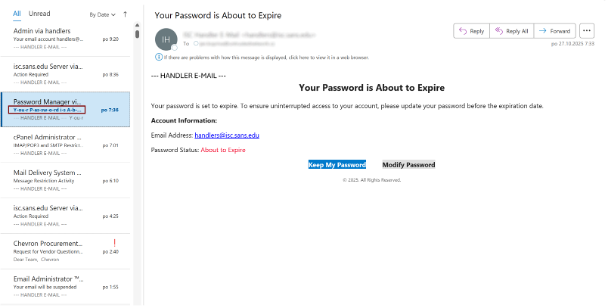
Researchers from the Internet Storm Center observed a malicious email whose subject line appeared strange in the Outlook message list but looked perfectly normal once opened.
The analysis of the headers revealed a subject line split into two encoded parts:

This format, known as encoded-word RFC 2047, is a method used to send special characters within emails (often via Base64 encoding). Once decoded, the visible text read “Your Password is About to Expire,” but soft hyphens (U+00AD), invisible hyphenation marks, had been added between the letters. These characters disrupt filters without being visible to the user.
Credit: Internet Storm Center
2.How This Attack Works
Imagine an email header like the address on an envelope. Normally, it’s written in plain text. Here, the attacker slips in a “coded” writing mode defined by email standards, known as an encoded-word. It’s a legitimate mechanism under RFC 2047, originally designed to properly handle accents or non-Latin alphabets. It wraps the subject line into a small technical package — like folding a note inside the address field.
Inside that package, the text is written in UTF-8, the universal alphabet of the Internet, then compressed in Base64 so it travels without distortion. When the email client displays it, it unfolds the package and shows a normal-looking subject line.
That’s where the trick happens. The attacker inserts fake characters called soft hyphens (Unicode code U+00AD) between letters. These are invisible markers used to suggest where a word could be broken if it wrapped onto the next line. In a normal email, they aren’t displayed, the text looks perfectly fine.
But in the underlying code, those characters remain. A word like password becomes, in reality, p-a-s-s-w-o-r-d, with invisible breaks between letters. The user sees a normal word, but automated filters no longer recognize the keyword. Detection rules based on known trigger words simply fail, the message slips right through.
By combining encoded-word packaging (RFC 2047), UTF-8 encoding, and soft hyphen insertion, the attacker creates a double-faced subject line: clear and convincing to humans, fragmented and unrecognizable to keyword-based detection engines.
3.Why It’s a Concern
Traditional detection rules can no longer identify sensitive words like “password,” “account,” or “urgent.” The message header itself becomes an evasion vector, often ignored by filters. As a result, phishing campaigns become more effective, particularly those targeting credential theft or business account compromise.
4.How to Protect Effectively
4.1 Mail Gateway Rules (MTA / MTA-AV / CASB)
- Systematic decoding of encoded headers: Before inspection, decode all RFC 2047 encoded-words in Subject, From, and Reply-To fields, then analyze the decoded version (e.g., raw header → decode → normalize → scan).
- Invisible character detection: In the decoded version, look for suspicious Unicode format characters — at minimum U+00AD (soft hyphen), U+200B (zero-width space), U+200C/200D (ZWNJ/ZWJ). If they appear in large numbers (threshold to define), tag or quarantine the message.
- Alert signatures and regex examples:
- Detect presence of encoded-words in Subject: =\?[^?]+\?[BbQq]\?[A-Za-z0-9+/=]+\?=
- After decoding, detect soft hyphen: look for\u00AD or hex\xAD
- Combined rule: Subject matches encoded-word AND decoded contains U+00AD → HIGH severity
- Sanitization before display: Strip invisible characters from the subject shown to users and display a notice if the original version differed (e.g., banner: “Subject modified by the mail gateway for security reasons”).
- Conditional blocking: If the decoded Subject contains more than N format-control characters andthe body contains external URLs, automatically quarantine the message (e.g., N ≥ 3).
4.2 SIEM / SOC Rules
- MTA log ingestion: Index events such as “subject_decoded_contains_invisible” as structured fields.
- Correlated alerting: Combine detection of an altered Subject with any webproxy connection to a credential-harvesting domain → High priority.
- Incident playbook updates: Include account isolation, mailbox log collection, link forensics, and session invalidation in case of compromise.
4.3 Endpoint and Web Proxy Detection
Block or sandbox domains hosting credential-harvesting pages (for example: stopsoriasis[.]co[.]il/Webmail/webmail.php), log all access attempts, and correlate them with email filter alerts.
- Practical Tests and Exercises
- Technical test: Send a few RFC 2047-encoded emails containing soft hyphens (U+00AD) and confirm they’re decoded, detected, and logged by the mail gateway and SIEM.
- User simulation: Launch a small internal phishing simulation and measure reporting vs. click rates.
- False positive check: Ensure that removing invisible characters doesn’t affect legitimate messages (names with accents, non-Latin characters, etc.).
- Mail-to-web correlation:Simulate a click to a controlled test domain and verify that the SOC playbook is triggered.
Phishing attacks using invisible characters in email subject lines show that security is no longer only about the content of emails — it’s also about their structure. Much like homograph attacks, which exploit visually similar characters in domains or URLs to mislead users, these new tactics rely on the hidden complexity of Unicode to evade both human scrutiny and machine detection.
By systematically decoding headers, detecting invisible characters, and educating users, organizations can eliminate this risk before it spreads.
Threats now evolve in the silence of code — we must learn to see what our eyes cannot.
Source: Internet Storm Center – A phishing with invisible characters in the subject line